The Digital Playbook by Linked | March 2026
Introduction: Why TikTok Matters for Your Business in 2026
TikTok has evolved from a platform for entertainment into a legitimate business powerhouse. In 2026, brands that master TikTok aren't just getting views they're building loyal audiences, establishing authority, and generating consistent revenue.
Whether you're a digital marketer, entrepreneur, or content creator, TikTok is no longer optional; it's essential.The platform's algorithm is unlike any other social network. While Instagram prioritizes followers and YouTube prioritizes watch time, TikTok prioritizes engagement and watch completion rate. This means a brand-new account can go viral just as easily as an established one if you understand the mechanics.
In this guide, you'll learn the exact TikTok strategy that's working in 2026, from content creation to monetization, with actionable steps you can implement today.

Part 1: Understanding the TikTok Algorithm in 2026
How TikTok's Algorithm Works
TikTok's algorithm operates on a For You Page (FYP) system that prioritizes content based on several key factors:
Factor Weight What It Means Watch Time 40% How long users watch your video (aim for 50%+ completion rate) Engagement 30% Likes, comments, shares, and saves relative to views Video Information 15% Captions, hashtags, sounds, and trending audio User Behavior 15% What users similar to your audience engage withThe critical insight here is that TikTok doesn't care about your follower count. A micro-influencer with 1,000 followers can outperform a macro-influencer with 1 million followers if their content generates better engagement metrics.

The Three-Tier Content System
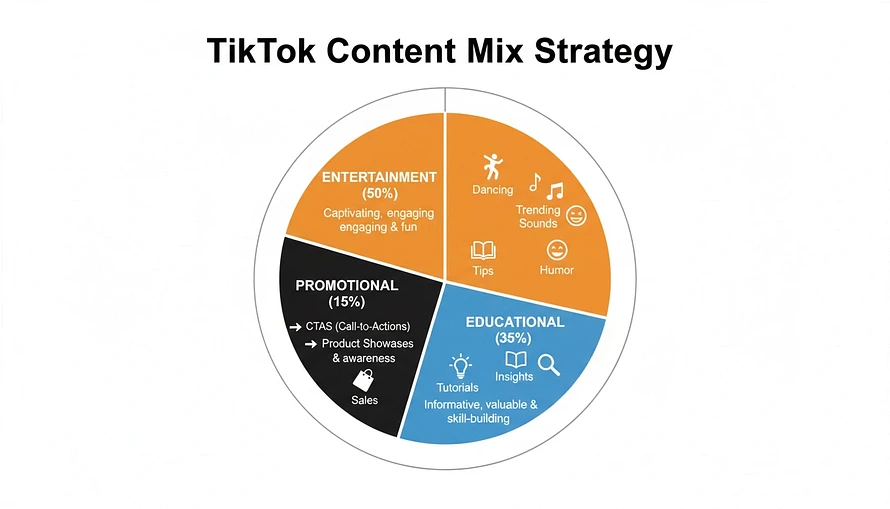
Successful TikTok creators in 2026 use a content mix that balances entertainment, education, and promotion:
Entertainment Content (50%) – Trending sounds, dances, humor, and relatable moments that drive maximum engagement and FYP distribution. This is your viral engine.
Educational Content (35%) – Tips, tutorials, insights, and valuable information that position you as an authority. This builds trust and keeps viewers coming back.
Promotional Content (15%) – Direct calls-to-action, product showcases, and sales pitches. Keep this minimal to avoid algorithm suppression.
Part 2: Creating TikTok Content That Converts
The 15-Second Hook Formula
TikTok videos are short, but the first 3 seconds are critical. Users decide whether to watch or scroll in milliseconds.
The Hook Formula:
1.First 0.5 seconds – Visual surprise or curiosity gap (text overlay, sudden scene change, or unexpected statement)
2.Seconds 1-3 – Promise of value (what will they learn or feel?)
3.Seconds 4-15 – Deliver on the promise with clear, actionable content
Example Hook:
•Text overlay: "This Instagram trick got me 50K followers in 30 days"
•Visual: You on camera, pointing at screen
•Content: Quick breakdown of the strategy

Trending Sounds & Audio Strategy
In 2026, audio is king on TikTok. Videos using trending sounds get 40% more views than videos with original audio.
How to use trending sounds effectively:
•Use sounds that align with your niche (a finance tip with a trending sound about money)
•Don't just use the sound; make it relevant to your message
•Combine trending audio with original content for maximum reach
•Check the "Sounds" tab daily to stay current
Video Format That Works
The highest performing TikTok formats in 2026 are:
Talking Head (25% of viral content) – You on camera, speaking directly to the audience. Build personal connection and authority.
Screen Recording + Voiceover (20%) – Show your process, tools, or results while explaining. Perfect for tutorials and case studies.
Before & After (18%) – Transformation content. "Before I knew this strategy" vs. "After I implemented it."
Text-Based Storytelling (15%) – Captions with minimal visuals. Great for advice and insights.
Carousel/Montage (12%) – Quick cuts between multiple scenes. High energy, high engagement.
Trend Participation (10%) – Adapt trending formats to your niche.

Part 3: Building Your TikTok Content Calendar
The Weekly Content Mix
For consistent growth, post 4-7 times per week with this distribution:
•Monday & Wednesday – Educational content (peak engagement days)
•Tuesday & Thursday – Entertainment/trending content (algorithm boost)
•Friday & Saturday – Promotional or behind-the-scenes (weekend engagement)
•Sunday – Recap or community engagement video

Content Pillars for Digital Marketers
If you're in digital marketing, focus on these five content pillars:
1.Quick Tips – 60-second actionable advice (highest engagement)
2.Case Studies – Real results from strategies you've implemented
3.Tool Reviews – Honest breakdowns of marketing tools
4.Mistakes to Avoid – Common errors in digital marketing
5.Personal Story – Your journey, lessons learned, and breakthroughs
Part 4: Monetization & Sales Strategy
TikTok Creator Fund vs. Direct Sales
Many creators focus on the TikTok Creator Fund, which pays $0.02-$0.04 per 1,000 views. At scale, this is minimal income.
The smarter approach in 2026:Use TikTok as a traffic driver to your real business:
•Link to your email list (build your owned audience)
•Direct to your course or digital product
•Funnel to your affiliate programs
•Drive to your e-commerce store a single viral TikTok can generate thousands of email subscribers or product sales—far more valuable than Creator Fund payments.
The TikTok-to-Email Funnel
1.Create valuable TikTok content that positions you as an expert
2.Include a clear CTA in your video: "Link in bio for the free guide"
3.Direct to a landing page offering a free resource (checklist, template, guide)
4.Capture emails in exchange for the resource
5.Nurture via email with your paid offers
This single funnel can generate $5,000-$50,000+ per month at scale.

Part 5: Advanced TikTok Tactics for 2026
Leveraging TikTok Trends Before They Peak
The creators winning on TikTok in 2026 are trend predictors. They spot trends early and adapt them to their niche before saturation.
How to find trends early:
•Follow the "Discover" page daily
•Join TikTok creator communities and Discord groups
•Use tools like TikTok's Trend Tracker
•Engage with content in your niche 30 minutes after posting
Collaborations & Duets
Duets and stitches are underutilized growth levers.
When you duet a popular creator, you:
•Get exposure to their audience
•Increase your engagement metrics
•Build relationships with other creators
Strategy: Duet with creators 10-100x your size, adding genuine value or humor to their content.
Going Live on TikTok
TikTok Live is one of the fastest ways to build community and direct engagement. Creators who go live 2-3 times per week see 5x faster follower growth.
Live stream ideas:
•Q&A sessions about your expertise
•Behind-the-scenes of your business
•Real-time strategy breakdowns
•Product launches or announcements

Part 6: Measuring Success & Optimization
Key Metrics to Track
Metric Target Why It Matters Completion Rate 50%+ Shows if your hook works Engagement Rate 5%+ Indicates algorithm favor Click-Through Rate 3%+ Measures conversion to your funnel Follower Growth 10-20% monthly Sustainable, organic growth Email Signups 1-5% of views Direct business valueThe 80/20 Rule on TikTok
Analyze your top 10 videos.What do they have in common?
•Same sound?
•Similar topic?
•Same video format?
•Same posting time?Double down on what works.
This is how you scale from 0 to 100K followers.
Part 7: Common TikTok Mistakes to Avoid
Mistake #1: Posting Inconsistently – The algorithm favors consistent creators. Post 4-7 times per week, every week.
Mistake #2: Ignoring Comments – Reply to every comment in the first hour. This signals engagement and boosts the algorithm.
Mistake #3: Using Watermarks – Videos with Instagram or YouTube watermarks get suppressed by TikTok's algorithm.
Mistake #4: Long Intros – Get to the point in the first 3 seconds. Long intros kill watch time.
Mistake #5: Ignoring Trends – Trending audio and formats are algorithm boosters. Use them strategically.
Mistake #6: No Clear CTA – Always tell viewers what to do next (follow, comment, check bio, etc.).

Conclusion: Your TikTok Action Plan
TikTok in 2026 is the fastest way to build authority, grow an audience, and generate sales. The platform rewards consistency, creativity, and strategic thinking.
Your next steps:
1.Create your TikTok account (or audit your existing one)
2.Define your five content pillars
3.Create 10 videos this week using the formulas in this guide
4.Set up your email capture funnel
5.Post consistently and measure your metrics
The creators winning on TikTok aren't necessarily the most talented—they're the most strategic. Start today, and you could have 100K followers and a thriving business by the end of 2026.

References
[1] TikTok Official Creator Handbook 2026 –[2] Social Media Examiner – TikTok Algorithm Study 2026 –[3] Creator Economy Report 2026 –[4] TikTok Monetization Guide –
Ready to dominate TikTok in 2026? Join thousands of digital marketers learning proven strategies in The Digital Playbook by Linked. Start with our free community tips, then upgrade to our $1/month course for the complete playbook. Explore Free Tips | Start Your Course